Performance impact of KDE’s recently used files tracking
Created
Modified
Published
Dang, kde-open5 is slow sometimes. What’s going on?
$ strace -o strace_$(date +%s).log -rTCw /usr/bin/kde-open5 tmp.html
# -o: Path to output log file.
# -r: Prepend relative timestamp on each line
# -T: Show time spent in actual syscall
# -C: Summarize and print regular output.
# -w: Summarise wall clock time instead of system time.
Let’s check out the summary.
% time     seconds  usecs/call     calls    errors syscall
------ ----------- ----------- --------- --------- ----------------
 38.37    0.133633       66817         2           fdatasync
 15.41    0.053678          23      2357      1375 stat
  9.98    0.034767         100       349        10 futex
Well, there’s the problem: two calls to fdatasync.
$ grep 'fdatasync(' strace_1539273593.log
     0.000083 fdatasync(13)             = 0 <0.031164>
     0.000084 fdatasync(14)             = 0 <0.102469>
In this case, the first call took 31 ms and the second 102 ms, but depending on how busy the disk is, I’ve seen this syscall take more than 200 milliseconds or even over a second in rare cases. Just two calls dwarf all the other syscalls.
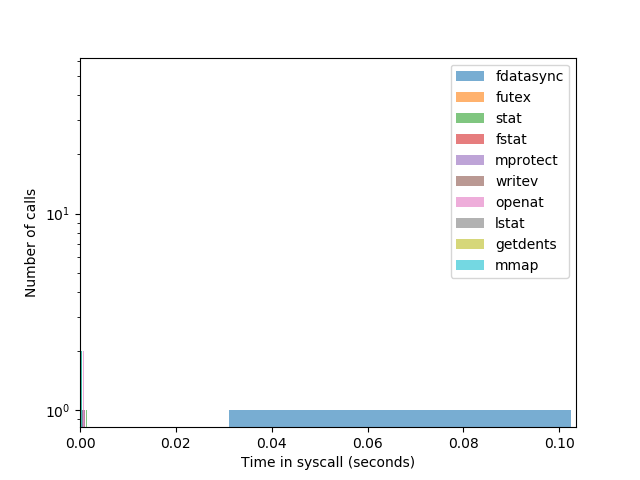
Ah, perhaps this disk has been mounted with data=journal and this explains why fdatasync is so slow?
$ findmnt /
TARGET SOURCE    FSTYPE OPTIONS
/      /dev/sda2 ext4   rw,relatime,errors=remount-ro,data=ordered
Nope! It uses data=ordered, which “performs slightly slower than writeback but significantly faster than journal mode” according to the kernel documentation for ext4.
But why does kde-open5 need fdatasync in the first place? Let’s fire up GDB and find out.
$ gdb -ex 'catch syscall fdatasync' -ex 'run' --args /usr/bin/kde-open5 tmp.html
After installing some debugging packages and running a backtrace, let’s look at the interesting parts:
#0  0x00007ffff5c442e7 in fdatasync (fd=fd@entry=13) at ../sysdeps/unix/sysv/linux/fdatasync.c:28
#1  0x00007ffff64c1ecf in QLockFilePrivate::tryLock_sys (this=this@entry=0x5555558956d0) at io/qlockfile_unix.cpp:213
[ snip . . . ]
#10 KConfig::sync (this=<optimized out>) at ./src/core/kconfig.cpp:434
#11 0x00007ffff4006b55 in KConfig::~KConfig (this=0x7fffffffcf60, __in_chrg=<optimized out>) at ./src/core/kconfig.cpp:286
#12 0x00007ffff7762246 in KRecentDocument::add (url=..., desktopEntryName=...) at ./src/core/krecentdocument.cpp:151
#13 0x00007ffff7b511ef in KRun::runService (_service=..., _urls=..., window=window@entry=0x0, tempFiles=false, suggestedFileName=..., asn=...) at ./src/widgets/krun.cpp:782
#14 0x00007ffff7b51eb5 in KRun::runUrl (u=..., _mimetype=..., window=0x0, flags=..., suggestedFileName=..., asn=...) at ./src/widgets/krun.cpp:248
[ snip . . . ]
#37 0x00007ffff6538a84 in QCoreApplication::exec () at kernel/qcoreapplication.cpp:1297
#38 0x000055555555744e in ClientApp::kde_open (this=0x7fffffffdac0, url=..., mimeType=..., allowExec=false) at ./kioclient/kioclient.cpp:204
#39 0x0000555555557ab9 in ClientApp::doIt (this=0x7fffffffdac0, parser=...) at ./kioclient/kioclient.cpp:285
#40 0x0000555555556feb in main (argc=<optimized out>, argv=<optimized out>) at ./kioclient/kioclient.cpp:168
We can see that ClientApp::kde_open eventually calls KRun::runUrl, which calls KRecentDocument::add.
Aha! It seems kde-open5 adds the file’s URI to the list of recently used files. To keep track of recently used files, KDE stores a Link type desktop file in ~/.local/share/RecentDocuments/.
(As an aside, I’m not sure why KDE stores links to recent files in ~/.local/share/RecentDocuments rather than ~/.cache or $XDG_CACHE_HOME from the FreeDesktop standard, but maybe these files aren’t considered a cache.)
Here’s an example:
[Desktop Entry]
Icon=text-csv
Name=Untitled 2.csv
Type=Link
URL[$e]=file://$HOME/Documents/Untitled%202.csv
X-KDE-LastOpenedWith=LibreOffice
We can see what line in the code this is happening by examining the call stack, starting from KRecentDocument::add to KConfig::sync, QLockFile::lock, and eventually fdatasync. For example, I used apt-get source kio to find line 151 of src/core/krecentdocument.cpp:
KDesktopFile configFile(ddesktop);
Ubuntu hosts the source for Bionic Beaver here:
kio 5.44.0-0ubuntu1 source package in Ubuntu
https://launchpad.net/ubuntu/+source/kio/5.44.0-0ubuntu1
Unfortunately, while Launchpad makes it easy to download a tar.xz archive of the source code, it does not make it easy to browse the same source code including the patches that get applied during the build process. Instead I’ve linked to the KDE Git repository for version 5.44.0.
// This is called by foundMimeType, since it knows the mimetype of the URL
bool KRun::runUrl(const QUrl &u, const QString &_mimetype, QWidget *window, RunFlags flags, const QString &suggestedFileName, const QByteArray &asn)
https://cgit.kde.org/kio.git/tree/src/widgets/krun.cpp?h=v5.44.0#n181
return KRun::runService(*offer, lst, window, tempFile, suggestedFileName, asn);
https://cgit.kde.org/kio.git/tree/src/widgets/krun.cpp?h=v5.44.0#n248
qint64 KRun::runService(const KService &_service, const QList<QUrl> &_urls, QWidget *window,
               bool tempFiles, const QString &suggestedFileName, const QByteArray &asn)

 // [snip...]

 if (!tempFiles) {
     // Remember we opened those urls, for the "recent documents" menu in kicker
     for (const QUrl &url : _urls) {
         KRecentDocument::add(url, _service.desktopEntryName());
     }
 }
https://cgit.kde.org/kio.git/tree/src/widgets/krun.cpp?h=v5.44.0#n779
void KRecentDocument::add(const QUrl &url, const QString &desktopEntryName)

// [snip...]

// create the applnk
KDesktopFile configFile(ddesktop);
KConfigGroup conf = configFile.desktopGroup();
conf.writeEntry("Type", QStringLiteral("Link"));
conf.writePathEntry("URL", openStr);
// If you change the line below, change the test in the above loop
conf.writeEntry("X-KDE-LastOpenedWith", desktopEntryName);
conf.writeEntry("Name", url.fileName());
conf.writeEntry("Icon", KIO::iconNameForUrl(url));
https://cgit.kde.org/kio.git/tree/src/core/krecentdocument.cpp?h=v5.44.0#n150
KConfig::~KConfig()
{
    Q_D(KConfig);
    if (d->bDirty && (d->mBackend && d->mBackend->ref.load() == 1)) {
        sync();
    }
    delete d;
}
https://cgit.kde.org/kconfig.git/tree/src/core/kconfig.cpp?h=v5.44.0#n282
bool KConfig::sync()

// [snip...]

// lock the local file
if (d->configState == ReadWrite && !d->lockLocal()) {
    qWarning() << "couldn't lock local file";
    return false;
}
https://cgit.kde.org/kconfig.git/tree/src/core/kconfig.cpp?h=v5.44.0#n433
(It’s a good thing we have debuggers like GDB, because I could not have untangled that call sequence just by inspecting the code.)
At any rate, the KDE documentation appears to imply that using fdatasync is intentional.
To save the current state of the configuration object we call the sync() method. This method is also called when the object is destroyed. If no changes have been made or the resource reports itself as non-writable (such as in the case of the user not having write permissions to the file) then no disk activity occurs. sync() merges changes performed concurrently by other processes - local changes have priority, though.
[ … ]
Additionally, once we are done writing entries, sync() must be called on the config object for it to be saved to disk. We can also simply wait for the object to be destroyed, which triggers an automatic sync() if necessary.
https://techbase.kde.org/Development/Tutorials/KConfig
I’m not exactly sure why these desktop files have to be saved this way, since they can easily regenerated later and often have to be regenerated anyway if, say, the file is renamed or the number of recent files gets bigger than 10.
Incidentally, back in 2012 one KDE developer mentioned that KConfig::sync was slow.
Not knowing the code around this, I would just like to point out that KConfig/KConfigGroup is already a “cache in memory”. So, reading/writing should be fast. KConfig::sync is the slow bit (reading from disk if it was changed from the outside, then writing to disk).
—David Faure, 2012-03-18
https://groups.google.com/forum/#!msg/kde-core-devel-ml/u2THiYT1jX8/3ZwUzScOQW0J
https://git.reviewboard.kde.org/r/104261/
Fortunately, we can tell KDE to disable recent document tracking globally by running this command:
$ kwriteconfig5 --group RecentDocuments --key UseRecent false
(Note that this takes effect immediately; you won’t have to log out and log back in to see the effects.)
Look at the difference in syscall distribution without fdatasync.
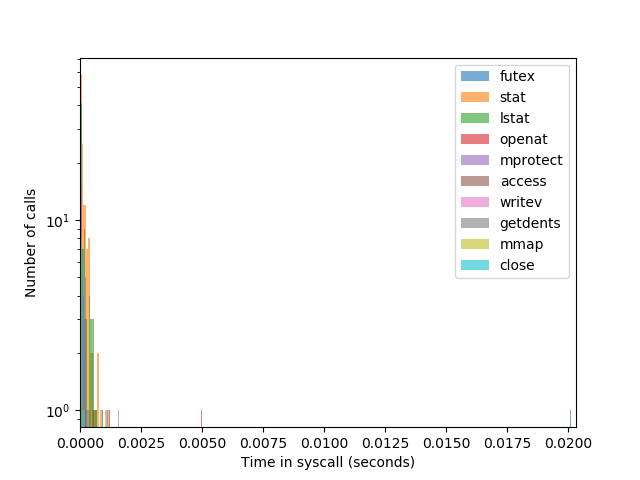
Some calls to futex and openat are slow, but still an order of magnitude faster than before.
Of course, strace adds some overhead, so let’s check our work using the less invasive time(1) coreutil to see how much time we’ve saved.
$ /usr/bin/time --output=time_$(date +%s).log --verbose /usr/bin/kde-open5 tmp.html
An unscientific trial using a sample size of one finds this runs 4 times faster (0.16 seconds instead of 0.64 seconds).
$ grep 'wall clock' time_*.log
time_1539271256.log:    Elapsed (wall clock) time (h:mm:ss or m:ss): 0:00.64
time_1539271269.log:    Elapsed (wall clock) time (h:mm:ss or m:ss): 0:00.16
$ grep 'File system outputs' time*.log
time_1539271256.log:    File system outputs: 80
time_1539271269.log:    File system outputs: 0
Is turning off recent documents worth it? It is for me.
Personally, I seldom used the recent documents tracking feature, and GTK applications like Firefox use a completely different list anyway (~/.local/share/recently-used.xbel if you’re curious).
Besides, I’m not a fan of the privacy implications.
The only way to keep the “recent documents” list and the plasma search clean is not to open any files you would not want your spouse, your boss, your coworker to see within a list of used files on your desktop. People get fired from their job because someone saw them checking their private Ebay sales aution progress…
Or you have to clean recent documents all the time which renders the funcionality completely useless.
—piedro, “Recent Documents” is messing with privacy and security - needs configuration, 2015-02-26
[ … ]
Planned:
- making an activity private - so that nothing is saved when in ‘gift shopping’ activity (like the private browsing mode in web browsers)
—Ivan Čukić, 2015-03-15
https://bugs.kde.org/show_bug.cgi?id=344575
I never liked the idea of recently-used file lists. I usually know what file I want to use and where it is, so for me there’s no real need for them. Even if I did find them useful, they’re constatly rearranging themselves, so actually locating the one file I want to use in an ever-shifting list of ten or twenty isn’t easy.
It’s also a privacy concern. I’m usually the only one to use my computer, so I only have one user account. I don’t mind if friends or family use it, and they often do to quickly check email or watch a movie while I’m away. Do I really want them seeing what files I’ve opened? Do they really want me to see what files they’ve opened?
https://alexcabal.com/disabling-gnomes-recently-used-file-list-the-better-way
However, if you want to keep the recent documents functionality, you can symlink ~/.local/share/RecentDocuments/. on a directory with tmpfs to make fdatasync much faster, since it’s essentially running on a RAM disk. Make sure it’s not globally readable, though. In my case, that’s /run/user/$UID.
$ df -T /run/user/$UID/
Filesystem     Type  1K-blocks  Used Available Use% Mounted on
tmpfs          tmpfs   1630560    68   1630492   1% /run/user/1000
So I symlink it like this:
$ mv ~/.local/share/RecentDocuments /run/user/1000/ && ln -s /run/user/1000/RecentDocuments ~/.local/share
(Not all shells provide $UID, so I used the actual directory here.)
I have tried this, and it works relatively well. Calls to fdatasync are about four orders of magnitude faster:
$ less strace.log
0.000068 fdatasync(14)             = 0 <0.000012>
0.000044 fdatasync(15)             = 0 <0.000012>
[ . . . ]
% time     seconds  usecs/call     calls    errors syscall
------ ----------- ----------- --------- --------- ----------------
[ . . . ]
  0.01    0.000024          12         2           fdatasync
If you want to automate this process and you have a RAM drive at /run/user/$UID/, you can use unburden-home-dir with a configuration like this:
$ cat ~/.config/unburden-home-dir/config
TARGETDIR=/run/user/1000/unburden-home-dir
$ cat .config/unburden-home-dir/list
m D .local/share/RecentDocuments recent_documents
Related: